
Introduction
Library breakdown and first-watched metrics let you compare what your library contains against what audiences actually watch, and see which titles are first picked up by new viewers. The redesigned Insights page surfaces these views as the Library Breakdown tile and the First Watched tile, both of which inherit the page-level time-range and granularity controls.
Library Breakdown
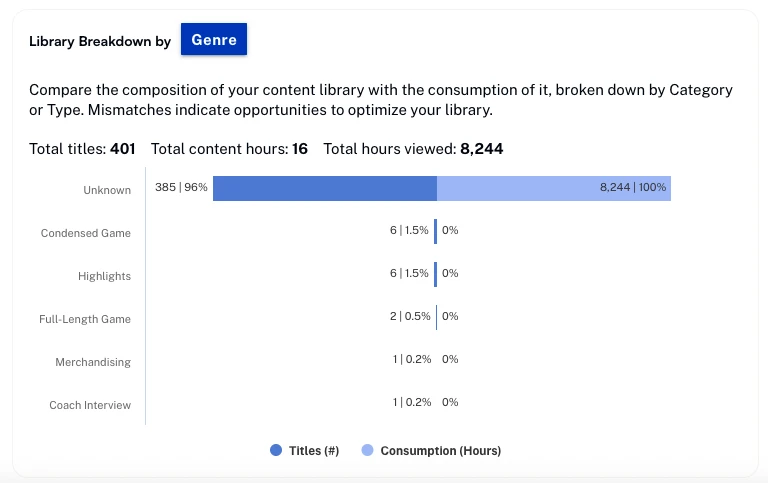
The Library Breakdown tile compares the composition of your content library with how it is consumed, broken down by Genre or Type. Mismatches between the two views point to opportunities to optimize your library — for example, content categories that take up shelf space but earn few hours viewed.
Actions
Use the category selector at the top of the tile to switch between Genre and Type. Use the tile's overflow menu to download the current view as a CSV file. The page-level time range and granularity scope which content is counted.
First Watched
The First Watched tile lists the titles that audience members watched first when they came to your service. Use it to identify which titles are doing the work of converting new viewers into engaged ones.
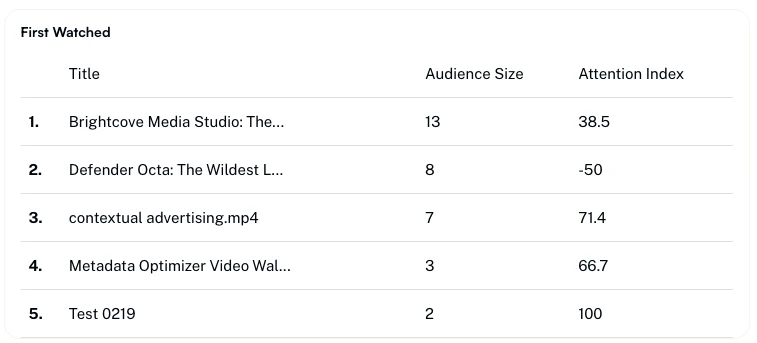
- Title — Title of the content.
- Audience size — Number of unique viewers who watched this title first.
- Attention index — On a scale of -100 to 100, compares the number of dissatisfied viewers with viewers who watched to at least 75% completion.