
Publishing a Video to Email
On most platforms, embedding videos directly into email isn’t possible. This isn't a Brightcove limitation, nearly every modern email system will strip out video player embed code due to security reasons. You can however, drive awareness and traffic for content by creating an email with some teaser text and a poster image. The Media module provides the ability to publish a video to an email landing page.
To publish a video to an email landing page, follow these steps:
- Open the Media module.
- Select a video.
- Click the three-dot menu next to Embed on Web and choose Publish to Email.
- Select a landing page from the Select Landing Page dropdown. The list will contain a Simple Landing Page, which is a system-provided, unstyled sample landing page. The list will also contain any published landing page experiences created using the Gallery module. Using a Gallery landing page provides more flexibility over the appearance and styling. Lead forms can also be used to capture viewer information. For more information on creating Gallery landing pages, see Creating a Landing Page Experience.
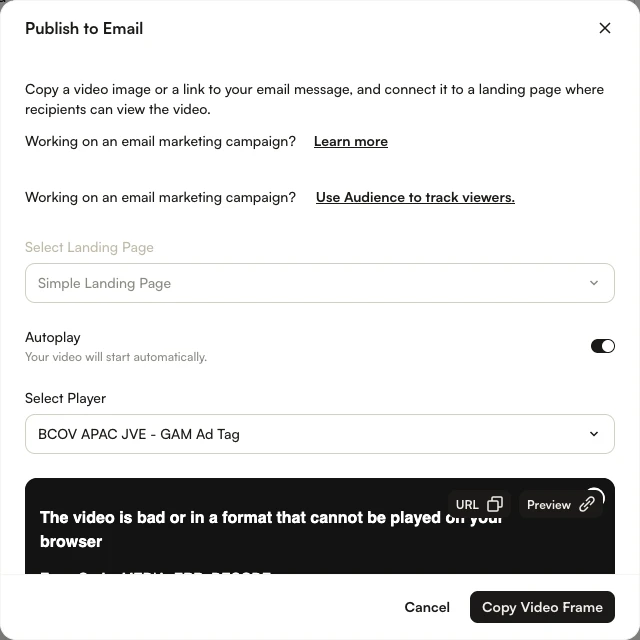
- Enable the Autoplay toggle if you want the video to start automatically. This option is only available when selecting the Simple Landing Page.
- Select a video player from the Select Player dropdown. This option is only available when selecting the Simple Landing Page. For Gallery landing pages, the player is assigned as part of the experience properties.
- (Optional) Click Preview to preview the landing page in a new tab.
- Click Copy Video Frame to copy the video poster image to your clipboard, then paste it into an email message.
Click URL to copy a shareable link that can also be distributed. When the email is received, clicking the poster image or the link will open the video in a browser tab.
If a Gallery landing page is used with a lead form, the lead form data can be downloaded using the Campaign module. For information, see Exporting Gallery Lead Data.