
Configuring Viewer ID Tracking
Overview
The Viewer ID Tracking property is used to capture/collect viewerIDs of known users by leveraging Eloqua's cookie tracking.
Requirements
The following requirements are needed for the Viewer ID Tracking:
- Brightcove Player v7.18.0 or newer
Implement using Players module
To configure the Viewer ID Tracking property, follow these steps:
- Open the Players module.
- Click the player's name to open its properties.
- On the Analytics tab, expand the Viewer ID Tracking accordion.
- Toggle Enable Viewer ID Tracking on, then select Eloqua from the Service dropdown.
- Enter your Eloqua Base Url (for example,
https://secure.p01.eloqua.com). - Enter your Site.
- Click Publish Changes.
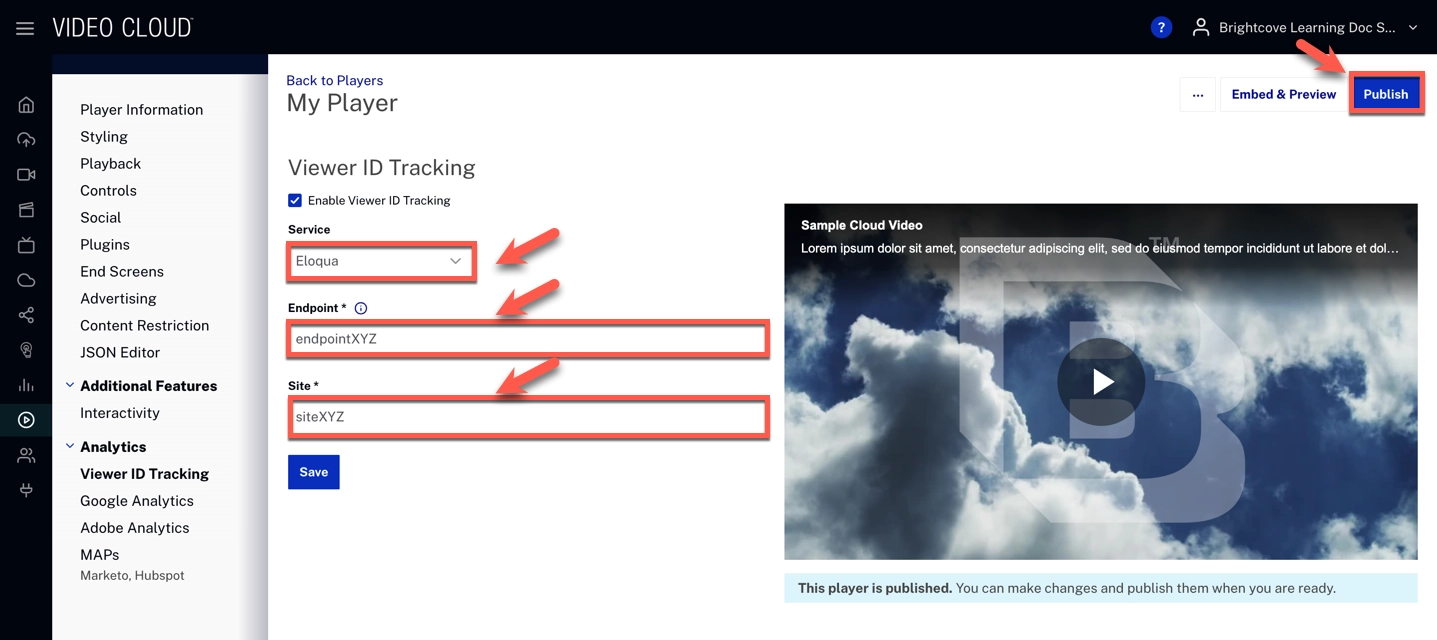
Implement using JSON Editor
To configure the Viewer ID Tracking property in the JSON Editor, follow these steps:
- Open the Players module.
- Click the player's name to open its properties.
- On the Overview tab, expand the JSON Editor accordion.
- Edit the JSON Editor object to add the
viewer_id_sourceproperty.Code Sample:
"viewer_id_source": {
    "source": "eloqua",
    "endpoint": "endpointXYZ",
    "site": "siteXYZ"
}